

Call Centre Wallboard
Phone System Wallboard with Live Data
- Configure your own view with graphs, charts and reports
- Measure agent call handling and KPIs in an instant
- Set flags and alerts against queue times and abandoned calls
- Complete visibility of office agents and home remote workers
- Customise the Wallboard to your exact business requirements

Create a True Contact Centre to Support your Business
- Add a further layer of resilience to your business where agents can simply log-in and take calls anywhere
- Boost customer satisfaction with fewer data entry errors and lower-than-average call handling time
- Wallboard stats allow you to review productivity and reduce costs across everything you do
- Review the success of your marketing campaigns and staff call handling at a glance with real-time call data
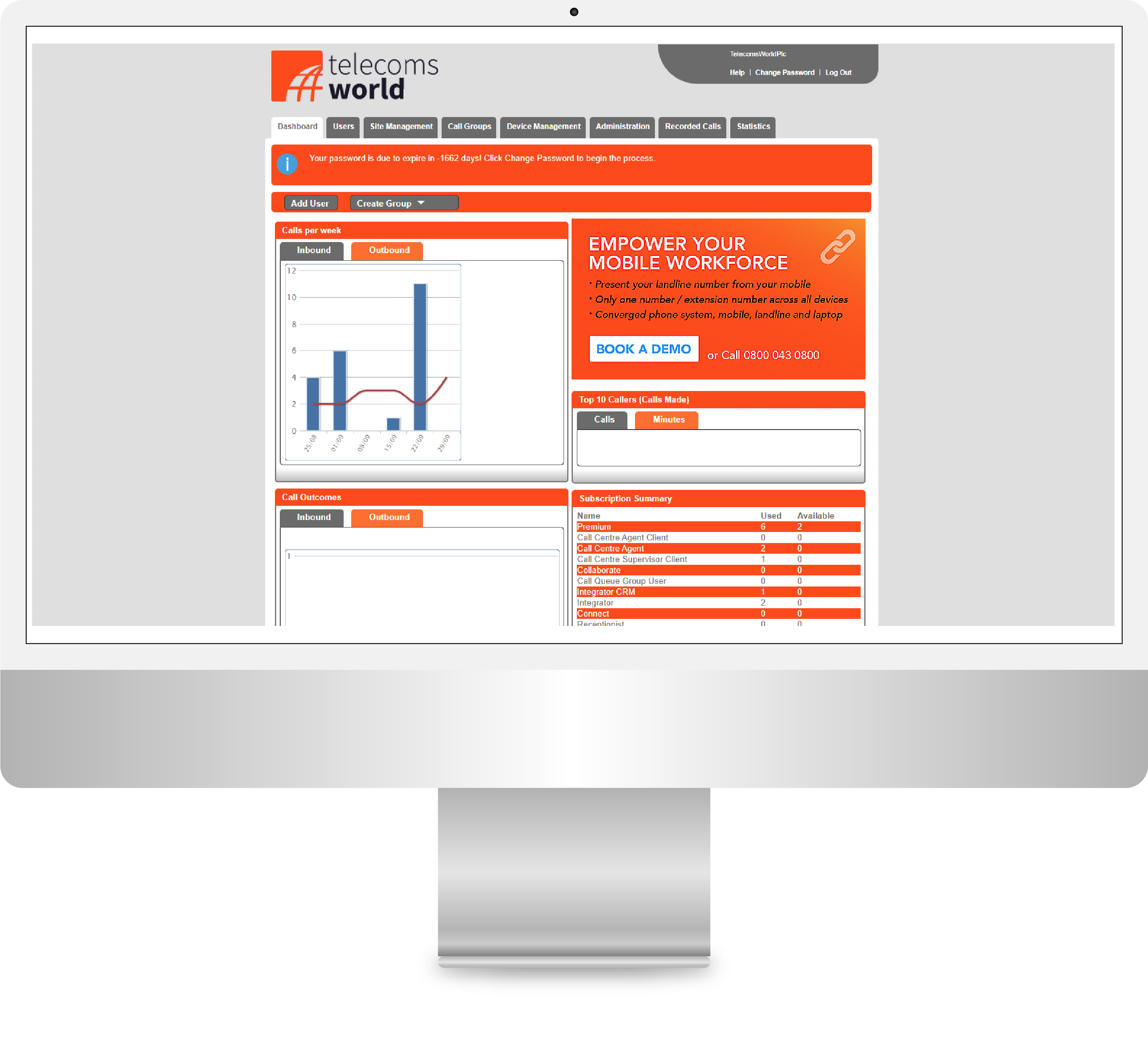
Example screen captures of our latest Call Centre Wallboards


Award-Winning Call and Contact Centre Analytics
See why more customers choose Telecoms World
Accurate analytics and flexible reporting on business calls, service channels and agent handling.
Calls, Emails and Message notifications are presented to agents in a single online view.
Configure wallboard views that show call response times, queue lengths, call durations, plus more, in real-time.
View the wallboard data in a range of custom reports. Display the data online or export files in excel.
Easily review historical data and filter records by date, time, agents. Audit daily, weekly and monthly reports.

FAQs
Call Centre Wallboards are used to analyse business call data in a single dashboard view. A range of graphs, charts, reports and alerts are configured within an online portal to help team leaders and management review call flows, agent call handling and ensure that Key Performance Indicators (KPIs) and Service Level Agreements (SLAs) are met at all times.
Business data from multiple channels can be brought into the Wallboard interface including email, live chat, social media, messenger and other communication media. Calls are only a part of how customers choose to interact with a company — the typical phone system wallboard with just call reports is a thing of the past.
Calls made through a phone system or a traditional PBX with SIP can be seen in real-time using a direct integration to push or pull files which include CDRs (Call Data Records). These call records are captured the moment a call is made or received, with additional tags to highlight the date, time, caller’s number, called number, time in queue, time to answer and call outcome.
Wallboards display real-time metrics and key performance indicators (KPIs) such as call volume, average wait time, call duration, agent availability, and service level. This enables agents and managers to have an instant overview of the call centre’s current status.
Award winning call solutions
Tailor-picked solutions designed for small to medium-sized businesses

Web-based Call Management
Calls to your business number can be diverted to your target (landline or mobile) during your operational business hours. Once you have configured your 'in-hours', choose where you would like to divert calls 'outside of working hours'. If calls are not configured to be diverted outside working hours, then voicemail-to-email is activated, meaning that calls are always captured.
Open the Call Manager to access the time schedule and set business open hours. Calls received in-hours can be configured to route to any UK landline number (01/02) or UK mobile (07). Your call-forwarding changes are saved and active at the click of a button.
Calls received outside business hours can also be routed to phone or voicemail. Ensure that you can identify business calls when answering from a mobile or home phone outside of business hours.
Web-based Call Managment is Included with Silver, Gold and Platinum Tariffs

VOCO Business Calls Mobile Application
The easy way to call customers back showing your business number, keeping your personal number private and creating a professional image to your callers.
The latest mobile application from Telecoms World places the power of business calls into your mobile phone, with Dial-Out Number Presentation and Call Analytics to view incoming and outgoing calls, along with the day-to-day control of where and when calls are answered within the call management features.
With the mobile application, you can seamlessly adapt to your business needs. The flexible number routing feature allows you to set working hours, divert numbers to landline or mobile, and receive out-of-hours voicemail as email, all at your fingertips.
Maintain a professional image with the ability to choose the business number you want to present. Access your contact directory, dial pad, or call history to add a number and Dial-Out, presenting your business number.
The VOCO Business Calls Mobile App is Included with Silver, Gold and Platinum Tariffs
Virtual Receptionist
More calls are being answered on mobile phones than ever before, a trend that's only growing with the rise of remote and home working. The mobile phone, with its portability and flexibility, is the perfect tool for handling calls on the move. When paired with the Virtual Receptionist, it provides users with a sense of security and peace of mind, knowing that every call is professionally introduced. The whisper message feature further enhances this, helping users distinguish between personal and business calls.
With the Virtual Receptionist, the caller will never hear your personal mobile voicemail message. It is less professional to hear "You are through to the Giff Gaff mobile voicemail" than "Thank you for calling Prime Roofing; please leave a message after the tone, and a team member will call you back within 24 hours." This helps with your brand image, giving the impression of a large, reputable, well-established business, boosting your confidence and credibility.
The Virtual Receptionist from only £19.99 per month
Real-time Call Data and Analytics
Call Analytics is an online platform that gives you complete insight into your business calls from a single interface. Review the success of your marketing campaigns and staff call handling at a glance. If your business uses multiple numbers across various marketing campaigns, you can monitor which campaigns are receiving the greatest response.
With detailed Call Analytics, you can accurately measure the results of when customers called, their geographical location, how long the call lasted and if they called more than once. Analysing the details of your telecommunication activities allows you to gain valuable market insight, re-focus your marketing efforts, boost sales and increase customer satisfaction.
Call Analytics from only £9.99 per month

The key benefits of Telecoms World as your communications provider
We provide fuss-free and cost-effective voice and data services to support businesses in the UK

UK Based Provider
All our services are managed from our UK headquarters with dedicated account managers and support teams available during business hours.

Increased Security
Enterprise-grade security measures protect your communications with advanced encryption and fraud detection systems.

Monitored Service
24/7 network monitoring ensures maximum uptime and immediate response to any service issues affecting your business.

Rated Excellent++
Our customers rate us excellent on Trustpilot with 4.8 stars based on consistent service quality and customer support.

Dedicated Support
Your own dedicated account manager provides personalized support and strategic guidance for your telecommunications needs.

_logo.svg)
.svg)